

- In the Volusion admin go to Inventory > Import/Export.
- Click the Volusion API button.

- At the top make sure the checkbox next to "Enable public XML for All Products" is checked and click Save.

- Click Run next to "Generic\Products" on this same page.

- Check the box in the row for "*".
- In the row for p.HideProduct type the word "null" into the "Where Value" text field.
- Click Run.
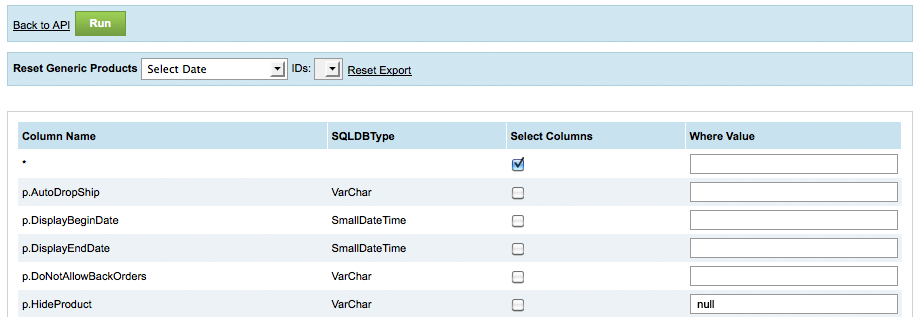
- This will generate an API URL. Copy the Encrypted Password from the URL for future use.

- In the Searchspring Management Console go to the Data Feed Setup page.
- Select "Volusion API" as the Feed/API Type.

- For API URL enter the URL of your store (ex. http://www.mysite.com).
- For Volusion Username enter the username of the account you used to generate the API (ex. james@mysite.com)
- For Encrypted Password enter the Encrypted Password you saved from the API URL.
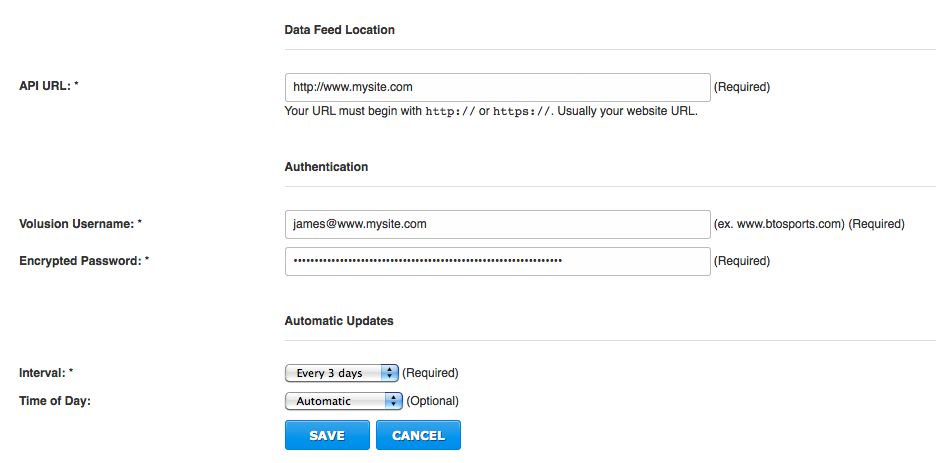
- Click Save or Next.
Comments
0 comments
Article is closed for comments.